Review Comments (2) Screenshots (5) Questions & Answers (1) Votes (1) Awards (12) Wiki  
(1)
Copernic Technologies Inc.
3.5.1
www.copernic.com
Freeware
240 people
Download Copernic Desktop...

9.27 MBDownloaded 1933 times

This software was checked for viruses Last month and was found to contain no viruses.
Click here to see antivirus report.
 
Video tutorial for Copernic Desktop Search 3.5
Frame

Review

This is official description

Simply install this search tool on your computer or laptop to search your computer's content (Word, Excel, emails, PDF, text, Zip files and many more). CDS instantly finds the information stored on your computer and displays search results by category.
 
The following review written by one of the Software Informer contributors applies to version 2.1

Copernic Desktop Search 2 is a program for searching content in your computer.

It requires 22.2 Mb. in your hard disk to be installed.

CDS 2 adds a toolbar to the system tray, and an icon. While running, the program will index the content of your hard disk in the background, to perform searches quickly.

It also adds a toolbar to your Internet Explorer, that you can use to launch web searches or desktop searches.

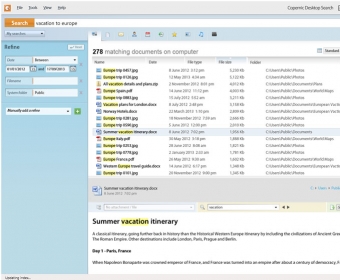
CDS 2 will search your emails, files, music, pictures, videos, contacts, favorites and history to find a match with your query. You can search for all the results, or restrict your search to some specific category. The results of the searches can be saved for later use under "My Searches".

When you click over a result, a preview of that result will be showed on the right lower pane (pretty much as in Outlook Express)

Although CDS 2 is not intended to perform web searches (Copernic has another product to do them), it has a "Web" button that will led you to the Online Search Service that Copernic has on the web.
  • It´s useful to find things that you know you have on your computer, but can´t remember where.
  • It often fails to find some things.

Reviewed by: Daniel Ángel Romero

Reviewer rating:

Reviewed: 3 years ago

What's new in version 3.5

Indexing of Eudora OSE is now supported
Fixed multiple deskband issues
Fixed Outlook 2000/XP detection issues
Fixed IMAP support issues in Thunderbird
And more! See the releases log.

What's new in version 3.4

Fixes
Fixed major zip archive indexing issue
Fixed Outlook action issues
Fixed installation issues
Fixed some integration issues (toolbar and deskbar)
Fixed some Outlook integration issues
Fixed multiple User Interface issues
Fixed minor Windows 7 integration issues
Report a wrong version Report a wrong program title Suggest a correction

Screenshots

main window main window Main window Main window Details Details Web Search Web Search
All 5 screenshots

Latest comments

Guest #100643459(beginner) 2 years ago 
To: tromberunt/
Lookeen just indexes outlook.
Reply
TromberunT(beginner) 2 years ago 
Copernic isn´t bad, but sometimes I am not really satified with the search results, beside this the indexing takes sometimes very long...A better tool is Lookeen! www.lookeen.net This tool is really fast, it isn´t a second application as Copernic, so everthing is clearly arranged AND Lookeen is cheaper!
Reply
Add new comment All 2 comments

E-mail Address:

Password:

Register now »

Forgot password?

Sign in with:
Download Software Informer Client
Copyright © 2012, Informer Technologies, Inc. About| Privacy and terms| Help| Feedback & Support| Partners program